

When we install an IPTV application, playlist credentials must be inputted. One of the most common ways, probably the easiest, to do this is Xtream Codes API login. It eases the part of adding sign in information into a player. In this article, I will first explain where this method has come from, then thoroughly show you how easy it is to create Xtream Code IPTV login and enter them in your software.
Disclaimer: This guide is intended solely for educational purposes. Xtream Codes API is a method to for legal streaming purposes . We do not promote or condone any unauthorized streaming or illegal IPTV services.
Where did Xtream Codes name come from?
Xtream Codes used to be a company, founded by 2 greek coders. They started the company which produced one of the best, if not THE best, Content Management Systems (also known as CMS). an IPTV CMS is what your provider is managing their service with, and the original feed-makers are using to create feeds. That company got raided and shutdown in the morning of September 18, 2019 . I still vividly remember that day. The unrest it put through the whole market was unbelievable. Now, although they are gone but still almost all CMS softwares out there are following XC steps.
Among all the great stuff they created, one thing is literally used every streaming application in the market and that is the method of inputting playlist credentials. Xtream Codes Login allows clients to divide a long string of streaming line into 3 simple parts and enter those short segments into the sign in form.
How to use streaming lines in Xtream Code format?
A streaming line, mostly known as M3U line/URL, is basically a link that carries the data of your IPTV Subscription playlist. Usually when you purchase an IPTV account, the provider sends an email, or even a message, including a link. Some even do better and send the Xtream Codes login details as well in divided parts. I will show you what it is and how to actually read this string to understand the details inside.
Understanding a M3U streaming line
Below is a sample of a streaming line in M3U format. This is the most common way of providing a playlist by IPTV providers. Knowing what it is and how to work with it is key here.
http://adomain.xyz:80/get.php?username=anyuser1&password=anypass1&type=m3u&output=ts
Let’s dissect it to parts and explain what each section means:
http://adomain.xyz : This is known as the server address, Host or URL. Different apps use various names but all mean the same. it’s the value before the port.
:80 : This is our HTTP streaming port, also called port. We connected to the main core server through this port number to first authenticate and then download the playlist. Do note that some services may use a different port number. We will simply use whatever is provided on the line.
get.php? : this is a php language command and whatever comes after is what we are requesting from the server.
username= : The value which is coming after = is the username of our IPTV subscription.
password= : The value which is coming after = is the password of our IPTV subscription.
type=m3u : the playlist type of this streaming address is M3U, which is the widely used type.
output=ts : ts, also referred to as “.ts” or “mpegts” is the extension format of our playlist.
By understanding those parts, next time when you look at a streaming line, you can easily understand the server address, port number, username and password. These are what we need to fill in the login form in Xtream Codes format on the IPTV application.
How to enter IPTV login details in Xtream Codes API format?
As I did mention earlier, nearly all applications in the market have this method of playlist input. So knowing Xtream Code login method is very much useful. For the example here, I’m using IPTV Smarters Pro login page.
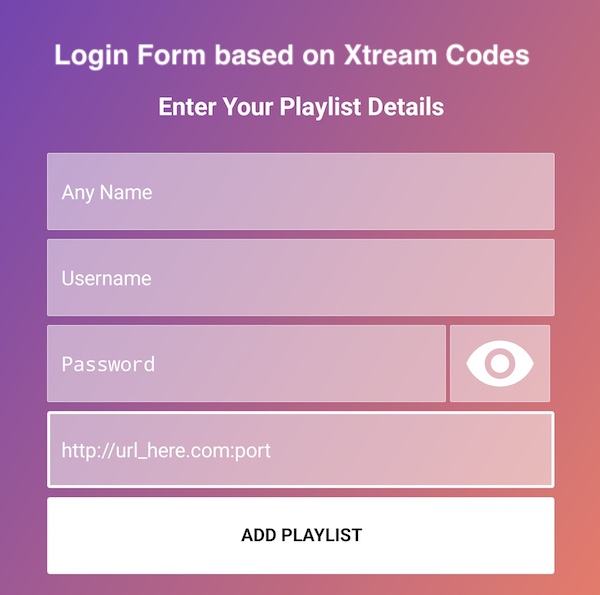
This is how the form should look like. You can see that there is no need to enter a long URL. Simply take a look at the streaming line you have from your supplier and then type the relevant info in. I use the line in the example given above and complete it below.

Let me remind you about the M3U address earlier
http://adomain.xyz:80/get.php?username=anyuser1&password=anypass1&type=m3u&output=ts
All the details here are added in the login form in the picture above in the Xtream Code API method, pretty simple and straight forward.
Frequently asked questions about Xtream Codes API login method
The tutorial above is very simple, I know, but there are some facts need pointing out, especially for our lovely visitors who have just stepped into IPTV territory 🙂
Is streaming in Xtream Code login method safer?
This has nothing to do with the level of security. It is an easy way to get something done. Adding your channel list in a simpler way comparing to other methods is not going to add a protection layer. All applications stream based on bare HTTP which is not encrypted, since most providers offer their service through that. If you are concerned about your online safety while streaming, use VPN.
Does adding the playlist with this method help resolving buffering issues?
No, it does not. Xtream Codes api is a way to add IPTV playlist to your application. If you use any other method of list input, the way your streaming software uses to read and play streams is the same, unless you change the Streaming format. That said, IPTV buffering is broad subject for which I will soon write a full guide and link it here.
Which fields in the Xtream Code login form are case-sensitive?
Username and password must be paid attention to. These two fields are case-sensitive. When entering the values, always follow the exact upper / lower case letters. Playlist name at the top, however, is not like that, you can name it however you like. Last field is also the same.
My service provider has given me all the info, but I dont see a port number in the address, why?
That is because the port they are using is 80. This port is the default one for web surfing and when it is not included in a streaming line, that is port 80. You can also not include it if you want. In the sample address above, we can not include the port number as well since it is 80. However, if the streaming line we have uses any other port numbers, we must include it.
Can I use Xtream Codes API login on multiple apps?
Yes — Xtream Codes credentials are supported by many IPTV players like IPTV Smarters Pro, XCIPTV, TiviMate, and others. You can use the same login details on multiple apps or devices at the same time, depending on your provider’s limit.
What does “Invalid URL or Portal” mean during login?
This usually means the server address is incorrect or missing a part. Make sure it starts with http:// or https:// and ends with a forward slash /. Double-check spelling and remove any extra spaces.
Does Xtream Codes API support VOD and Series sections too?
Yes — if your provider includes movies and series, they will show up automatically in your app once you log in via Xtream Codes. These sections appear separately from Live TV.
Can I use Xtream Codes login without a username and password?
No — Xtream Codes API requires both a valid username and password to authenticate. If you only have an M3U URL or file, you’ll need to use that method instead.
Why is the EPG (TV Guide) not showing after login?
Some providers don’t include EPG links in their Xtream Codes API response. You may need to ask your provider to supply a separate XMLTV URL or wait for the app to sync EPG data over time.
Is it possible to hide adult content when using Xtream Codes login?
Yes — most IPTV apps that support Xtream Codes also allow parental controls. You can usually set a PIN and hide adult or locked categories through the app settings.

No comments yet